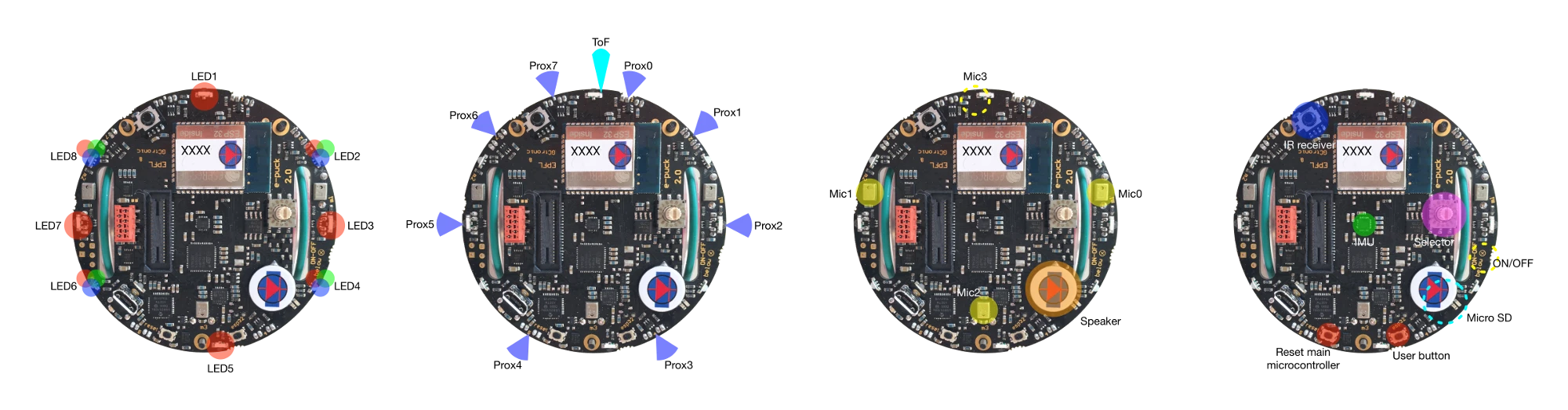
Position of the e-puck2 LEDs, proximity sensors, ToF sensor, microphones, speaker, IR receiver, IMU, selector and buttons.
The epuck2 module gives access to the sensors and actuators of the e-puck2 robot from the MicroPython firmware of the ESP32 radio module. The ESP32 exchanges data with the main microcontroller (STM32F407) through UART, using the advanced sercom protocol, and receives the camera images through SPI.
The functions need the robot selector in position 3 or 15, where the main microcontroller runs the advanced sercom protocol. The camera images are streamed continuously through SPI only in position 15 (faster); in position 3 every image is requested through UART.
The same API is available on e-puck2.0/2.1 (4 MB flash, no PSRAM) and on e-puck2.2 (8 MB flash and 2 MB PSRAM, so more RAM for the user programs).
A first program: print the API version and the proximity sensors, then turn on the front LED for one second
import epuck2
import time

print("API version:", epuck2.get_api_version())
print("proximity:", epuck2.get_proximity())
epuck2.set_leds(0x20)  # Front LED on.
time.sleep(1)
epuck2.set_leds(0)
System
API version and general state of the robot.
epuck2.get_api_version()
Get the version of the epuck2 module API, as major.minor (each number is padded with spaces to 2 characters, e.g. " 1.2 "). The minor version is incremented when functions are added, the major version when the existing functions change.
Returns string.
Print the API version
import epuck2
print(epuck2.get_api_version())
epuck2.get_selector()
Get the position of the rotary selector on top of the robot.
Returns integer between 0 and 15.
Run a different behavior depending on the selector
import epuck2
if epuck2.get_selector() == 15:
    print("camera images through SPI")
epuck2.button_pressed()
Get the state of the user button of the ESP32 radio module.
ReturnsTrue if the button is pressed, False otherwise.
Wait until the button is pressed and released
import epuck2
import time
while not epuck2.button_pressed():
    time.sleep_ms(10)
while epuck2.button_pressed():
    time.sleep_ms(10)
print("button pressed")
epuck2.get_battery()
Get the battery level as raw ADC value.
Returns integer, raw value (the higher, the more charged the battery).
The two wheels are driven by stepper motors: 1000 steps make one wheel revolution, about 12.9 cm.
epuck2.set_motors_speed(left, right)
Set the speed of the two motors. The motors keep the speed until it is changed: call set_motors_speed(0, 0) to stop the robot.
left
speed of the left motor in steps per second, between -1100 and 1100 (negative values move the wheel backward, values outside the range are limited to it). 1000 steps per second are one wheel revolution per second, about 12.9 cm/s.
right
speed of the right motor, same range as left.
Move forward, turn in place, then stop
import epuck2
import time
epuck2.set_motors_speed(500, 500)    # Forward at about 6.5 cm/s.
time.sleep(1)
epuck2.set_motors_speed(300, -300)   # Turn right in place.
time.sleep(1)
epuck2.set_motors_speed(0, 0)        # Stop.
LEDs
The robot has 8 LEDs around its body: LED1, LED3, LED5 and LED7 are red, LED2, LED4, LED6 and LED8 are RGB. It also has a green body LED and a red front LED.
epuck2.set_leds(value)
Turn on or off the red LEDs (LED1, LED3, LED5, LED7), the body LED and the front LED.
value
bitmask, a bit set to 1 turns the corresponding LED on:
Bit
Value
LED
0
0x01
LED1 (front)
1
0x02
LED3 (right)
2
0x04
LED5 (back)
3
0x08
LED7 (left)
4
0x10
Body LED (green)
5
0x20
Front LED (red)
Turn on LED1 and the front LED, then turn all of them off
import epuck2
import time
epuck2.set_leds(0x01 | 0x20)
time.sleep(1)
epuck2.set_leds(0)
epuck2.set_rgb(led, red, green, blue)
Set the color of one RGB LED.
led
LED to set: 0 = LED2, 1 = LED4, 2 = LED6, 3 = LED8 (other values are ignored).
red
intensity of the red component, between 0 (off) and 100 (full on).
green
intensity of the green component, between 0 and 100.
blue
intensity of the blue component, between 0 and 100.
Sounds and tones played by the speaker of the robot.
epuck2.play_sound(id)
Play one of the sounds stored in the robot.
id
sound to play:
Value
Sound
0x01
Mario
0x02
Underworld
0x04
Star Wars
0x08
4 kHz tone
0x10
10 kHz tone
0x20
Stop the sound
0x40
Christmas song
Play the Mario song for 3 seconds
import epuck2
import time
epuck2.play_sound(0x01)
time.sleep(3)
epuck2.play_sound(0x20)
epuck2.play_freq(value)
Play a tone at the given frequency, until another frequency or 0 is given.
value
frequency in Hz, between 100 and 10000 (values outside the range are limited to it); 0 stops the tone.
Play 500 Hz, then 2000 Hz, then stop
import epuck2
import time
epuck2.play_freq(500)
time.sleep(1)
epuck2.play_freq(2000)
time.sleep(1)
epuck2.play_freq(0)
Sensors
The values are the last ones received from the main microcontroller, which sends all the sensors continuously.
epuck2.get_proximity()
Get the values of the 8 infrared proximity sensors placed around the robot. The higher the value, the closer the object.
Returns list of 8 integers between 0 (no object) and 4095 (object very close): index 0 is the front right sensor (Prox0), then the sensors follow clockwise up to the front left sensor (Prox7).
Stop when an object is in front of the robot
import epuck2
prox = epuck2.get_proximity()
if prox[0] > 500 or prox[7] > 500:
    epuck2.set_motors_speed(0, 0)
epuck2.get_distance()
Get the distance measured by the front time of flight (ToF) sensor.
Returns distance in millimeters, between 0 and 2000.
Print the distance of the object in front of the robot
import epuck2
print(epuck2.get_distance(), "mm")
epuck2.get_acc_raw()
Get the raw values of the accelerometer (range +-2 g).
Returns list [x, y, z], each value between -1500 and 1500.
Print the accelerometer values
import epuck2
x, y, z = epuck2.get_acc_raw()
print(x, y, z)
epuck2.get_gyro_raw()
Get the raw values of the gyroscope (range +-250 degrees per second).
Returns list [x, y, z], each value between -32768 and 32767.
Print the rotation speed around the vertical axis
import epuck2
print(epuck2.get_gyro_raw()[2])
epuck2.get_mic_volume()
Get the volume (amplitude) measured by the 4 microphones.
Returns list of 4 integers between 0 and 4095: [right, left, back, front].
Get the samples of the 4 microphones: 160 samples per microphone, 10 ms of sound (16 kHz sampling rate). The function waits until the data is received.
buffer
bytearray of at least 1280 bytes, filled with 16-bit signed samples (little endian) interleaved as right, left, back, front: R0, L0, B0, F0, R1, L1, ..., F159.
ReturnsTrue on success, False otherwise. Raise ValueError if the buffer is smaller than 1280 bytes.
Get the samples of the front microphone
import epuck2
import struct
buf = bytearray(1280)
if epuck2.get_mic_data(buf):
    front = [struct.unpack_from("<h", buf, (i * 4 + 3) * 2)[0] for i in range(160)]
    print(max(front), min(front))
epuck2.get_tv_remote()
Get the last command received from a TV remote control (RC5 protocol) by the infrared receiver.
Returns integer, data field of the RC5 command (e.g. the number of the button pressed).
Print the TV remote command
import epuck2
print(epuck2.get_tv_remote())
epuck2.set_magnetometer(enable)
Enable or disable the magnetometer. Its values (x, y, z in micro Tesla) are returned by get_all_sensors() at the indexes 9, 10 and 11. The behavior depends on the IMU of the robot:
MPU-9250: with the selector in position 15 the magnetometer is enabled at startup, in position 3 it must be enabled with this function (values updated 8 times per second). The main microcontroller firmware doesn't implement the disable yet: once enabled, the magnetometer keeps running until the robot is reset.
ICM-20948: the magnetometer is always enabled (values updated 50 times per second), this function is not needed.
enable
True to enable the magnetometer, False to disable it.
ReturnsTrue on success, False otherwise.
Enable the magnetometer and print its values
import epuck2
import time
epuck2.set_magnetometer(True)
time.sleep_ms(200)  # Wait for the first measures.
print(epuck2.get_all_sensors()[9:12])
Bulk functions
Set all the actuators or read all the sensors with a single call, in the same format as the advanced sercom / WiFi packets.
bitmask: bit 0 = 1 calibrates the proximity sensors (keep the robot away from objects); bit 1 = 1 enables the onboard obstacle avoidance (not implemented yet); bit 2 = 0 means that left and right are speeds, 1 that they are motor steps (position).
left
left motor speed (-1100..1100 steps per second, see set_motors_speed()) or steps.
right
right motor speed or steps.
leds
red LEDs, body LED and front LED bitmask (see set_leds()).
red2
the 12 values red2 ... blue8 are the intensities of the RGB LEDs LED2, LED4, LED6 and LED8, between 0 and 100 (see set_all_rgb()).
sound
sound to play (see play_sound()), 0 for none.
Move forward with LED1 and the front LED on, all RGB LEDs blue, no sound
Print the proximity sensors and the selector position
import epuck2
s = epuck2.get_all_sensors()
print("proximity:", s[13:21])
print("selector:", s[41])
Camera
The camera is connected to the main microcontroller. The image source depends on the selector position, read at the first camera call:
position 15: the main microcontroller streams 160x120 RGB565 images to the ESP32 through SPI, continuously. The ESP32 can crop, downscale and convert them to greyscale (camera_set_format()).
position 3: every image is requested to the main microcontroller through UART (115200 baud: a few images per second). The image is at most 4136 bytes.
Images are stored row by row, from the top-left pixel. RGB565 images use 2 bytes per pixel, big endian (RRRRRGGG GGGBBBBB); greyscale images use 1 byte per pixel (0 black, 255 white).
epuck2.camera_get_image(buffer, timeout_ms=1000)
Copy a new camera image into buffer, in the format returned by camera_get_format().
Selector 15 (SPI): wait for an image newer than the one returned by the previous call, at most timeout_ms milliseconds (-1 waits forever, Ctrl-C stops the wait).
Selector 3 (UART): request a new image to the main microcontroller and wait for it. timeout_ms is not used: the request fails by itself after about 1 s without answer.
buffer
bytearray of at least width * height * bytes_per_pixel bytes of the current format. CAM_IMAGE_SIZE bytes are enough for every format.
timeout_ms
maximum waiting time in milliseconds (SPI only), default 1000.
Returns the image id, incremented at each image received (images skipped by the program can be detected by comparing consecutive ids), or None on timeout or error.
Get an image and print the value of the central pixel
import epuck2
img = bytearray(epuck2.CAM_IMAGE_SIZE)
if epuck2.camera_get_image(img) is not None:
    width, height, bpp = epuck2.camera_get_format()
    i = ((height // 2) * width + width // 2) * bpp
    print(img[i:i + bpp])
epuck2.camera_get_format()
Get the format of the images returned by camera_get_image().
Returns tuple (width, height, bytes_per_pixel): bytes_per_pixel is 2 for RGB565 and 1 for greyscale. With selector 3 (UART) the format is known only after the first image, so None is returned before it.
Set the format of the images returned by camera_get_image(). The image covers an area of (width * zoom) x (height * zoom) pixels of the 640x480 camera sensor: a smaller zoom gives a more magnified image.
width
image width in pixels.
height
image height in pixels.
bytes_per_pixel
2 for RGB565 (color), 1 for greyscale.
zoom
sensor pixels per image pixel, see below.
x1
left side of the area on the sensor, -1 to center the area horizontally.
y1
top side of the area on the sensor, -1 to center the area vertically.
The allowed values depend on the selector position:
Selector 15 (SPI): the main microcontroller always streams the whole sensor at zoom 4 (160x120 RGB565) and the ESP32 converts the image while copying it. Zoom 4 crops the stream at full resolution, zoom 8 averages 2x2 stream pixels, zoom 16 averages 4x4 stream pixels. x1 and y1 are rounded down to multiples of 4. Default 160x120 RGB565 zoom 4.
Selector 3 (UART): the format is set on the main microcontroller. Zoom 1, 2 or 4, width and height between 1 and 255, image size (width * height * bytes_per_pixel) at most 4136 bytes. Default 40x40 RGB565 zoom 4.
ReturnsTrue if the format is set (UART: confirmed by the main microcontroller), False otherwise. Raise ValueError if a parameter is out of range.
Selector 15: whole view in greyscale at half resolution (80x60, 4800 bytes)
Selector 15: central 80x60 area at full resolution
epuck2.camera_set_format(80, 60, 2, 4)
Selector 3: 64x64 greyscale image
epuck2.camera_set_format(64, 64, 1, 4)
epuck2.camera_get_stats()
Get the image counters since boot or since the last camera_reset_stats().
Returns tuple (frames, errors). Selector 15 (SPI): images received by the ESP32 (streamed continuously, also when the program doesn't read them) and images discarded because of transfer errors. Selector 3 (UART): images received and failed requests.
Simple vision functions, implemented in C, working on the images returned by camera_get_image() (any buffer with the same layout can be used).
Common parameters:
img: the image (bytearray or any buffer).
fmt: the image format (width, height, bytes_per_pixel), as returned by camera_get_format().
roi: region of interest (x, y, w, h) to process, None for the whole image.
min_pixels: blobs with fewer pixels are ignored (noise), default 10.
max_blobs: maximum number of blobs returned, 1..64, default 8.
A blob is a group of selected pixels touching each other, also diagonally: two separate objects give two blobs. Each blob is returned as a tuple (pixels, cx, cy, x_min, y_min, x_max, y_max): number of pixels, centroid and bounding box (included), in image coordinates. The blobs are sorted by size, biggest first; the list is empty if nothing is found.
The work memory is allocated at each call and depends only on the width of the region (about 3 KB for 80 pixels, 6 KB for 160 pixels), so the functions can be used also on e-puck2.0/2.1. Invalid arguments raise ValueError.
Find the biggest red object in a 80x60 image (selector 15)
Get the mean color of an area of an RGB565 image, as HSV (hue, saturation, value). It can be used to learn the color of an object placed in front of the camera, then search it with image_find_blobs_color().
img
RGB565 image.
fmt
image format (width, height, 2).
roi
area (x, y, w, h), None for the whole image.
Returns tuple (hue, saturation, value): hue between 0 and 359 degrees (0 red, 60 yellow, 120 green, 180 cyan, 240 blue, 300 magenta), saturation (0 grey, 100 pure color) and value (brightness, 0 black) between 0 and 100.
Learn the color of the object in the middle of a 80x60 image
Find the blobs of the pixels of an RGB565 image whose color is in the given HSV range. The hue doesn't change much when the object is in shadow or more illuminated, so it is more reliable than the RGB values.
hue_min
minimum hue, between 0 and 359 degrees.
hue_max
maximum hue, between 0 and 359 degrees. If hue_min is greater than hue_max the range wraps around 0: for example 340, 20 selects the red colors.
sat_min
minimum saturation, between 0 and 100 (default 30: greyish pixels, whose hue is unreliable, are ignored).
sat_max
maximum saturation, between 0 and 100.
val_min
minimum value (brightness), between 0 and 100 (default 10: dark pixels, whose hue is unreliable, are ignored).
val_max
maximum value, between 0 and 100.
See the "Image processing" section for img, fmt, roi, min_pixels and max_blobs.
Returns list of blobs [(pixels, cx, cy, x_min, y_min, x_max, y_max), ...], biggest first, [] if none.
Follow a green object (selector 15)
import epuck2
FMT = (80, 60, 2)
epuck2.camera_set_format(80, 60, 2, 8)
img = bytearray(80 * 60 * 2)
while True:
    if epuck2.camera_get_image(img) is None:
        continue
    blobs = epuck2.image_find_blobs_color(img, FMT, 90, 150, max_blobs=1)
    if blobs:
        err = blobs[0][1] - 40  # Horizontal distance from the image center.
        epuck2.set_motors_speed(300 + 10 * err, 300 - 10 * err)
    else:
        epuck2.set_motors_speed(0, 0)
Find the blobs of the pixels whose grey level is in the given range. It works with greyscale and RGB565 images (for RGB565 images the luminance of the pixel is used).
grey_min
minimum grey level, between 0 (black) and 255 (white).
grey_max
maximum grey level, between grey_min and 255.
See the "Image processing" section for img, fmt, roi, min_pixels and max_blobs.
Returns list of blobs [(pixels, cx, cy, x_min, y_min, x_max, y_max), ...], biggest first, [] if none.
Find the areas that changed between two images of the same format (motion detection): the pixels whose grey level (luminance for RGB565 images) differs by at least threshold. The robot must not move, otherwise the whole image changes.
img
current image.
prev
previous image, same format as img.
threshold
minimum difference of grey level, between 1 and 255 (default 20).
See the "Image processing" section for fmt, roi, min_pixels and max_blobs.
Returns list of blobs [(pixels, cx, cy, x_min, y_min, x_max, y_max), ...], biggest first, [] if none.
Detect motion in front of the robot (selector 15)
import epuck2
FMT = (80, 60, 1)
epuck2.camera_set_format(80, 60, 1, 8)
img = bytearray(80 * 60)
prev = bytearray(80 * 60)
epuck2.camera_get_image(prev)
while True:
    if epuck2.camera_get_image(img) is None:
        continue
    moving = epuck2.image_diff(img, prev, FMT, min_pixels=30, max_blobs=1)
    if moving:
        print("motion at", moving[0][1], moving[0][2])
    img, prev = prev, img  # The current image becomes the previous one.